
A Wedding RSVP Website That Feeds Your Seating Chart
MyGuestWork gives couples a wedding RSVP website where each household replies online, with plus-ones by name and dietary requirements, and every reply lands on the guest list you seat from. Online RSVP is on Premium and Event Bundles.
Guests reply from their own link or a QR code on your printed invitation. On the day, the same event's live site shows them their table.
Premium Included on Premium and Event Bundles. Compare plans
Sophie & James
Wednesday 29 September 2027
You can RSVP for some or all of your party
Jessica Evans
Not responded yetMatthew Evans
Not responded yetYour response, dietary requirements and any note are shared with the event organiser. Privacy policy
Before: one RSVP per household
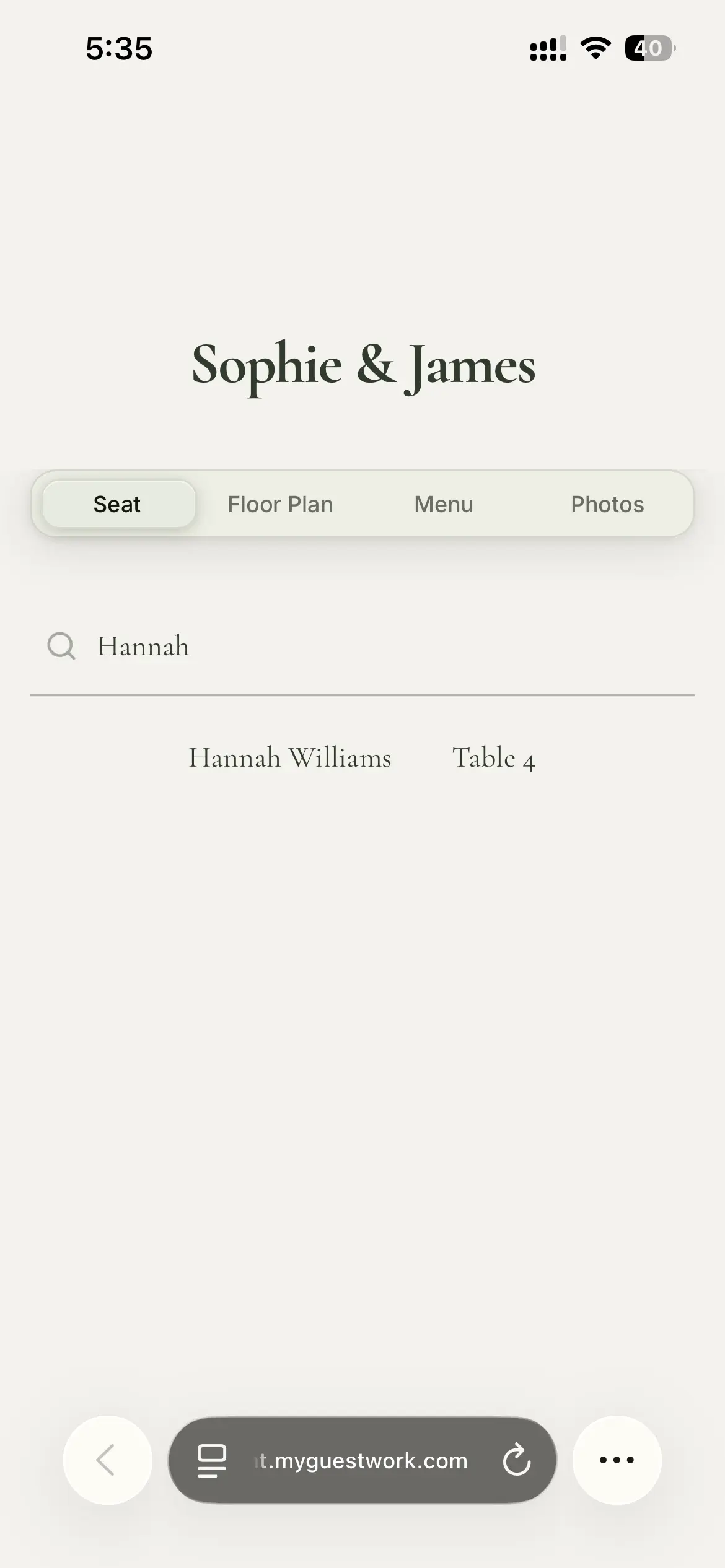
On the day: their table
What guests fill in on your wedding RSVP
Each invitation opens one RSVP page for everyone on it. A couple or a family replies together, and one person can answer for the whole household, so you are not chasing four people for one reply.
Guests tap Attending or Can't make it, then tell you their dietary requirements. You start from a list of common options, remove the ones you do not need and add your own. There is also a short note to you, for anything that does not fit.
Plus-ones are up to you: open to every guest, to selected guests, or to nobody. A guest who brings someone gives their name and their dietary requirements, so you know who is coming rather than a headcount.
To add a guest, you only need a first name. Each guest gets a personal RSVP link as soon as they are on your list. See how online RSVP works in full.
Sophie & James
Wednesday 29 September 2027
Emily Chen
Dietary requirements
Your response, dietary requirements and any note are shared with the event organiser. Privacy policy
RSVPs for a wedding weekend
If your wedding runs over more than one day, such as a welcome dinner, the wedding and a brunch the morning after, guests answer yes or no for each day they are invited to. A "Coming to everything?" shortcut answers yes for the whole household across every day in one tap.
Each guest is asked only about their own days, so the cousins invited to the wedding alone never see a question about the welcome dinner. Multiple days are on Premium and Event Bundles, like RSVP.
Ways wedding guests can reach their RSVP
-
Their own link
Every guest has a personal RSVP link. Send it by email with your invitation, or on WhatsApp from your own phone.
-
Your event-wide RSVP link
One link for everyone on your list, where guests type their name to find their RSVP. Sharing it turns on name lookup, so anyone with the link can find a name on your list. Send it to your guests, not to a public page.
-
A QR code on printed invitations
Print an RSVP QR code on your wedding invitations. Guests scan it, type their name and open their own RSVP.
-
A link for a group chat
For people not on your list yet, a shareable RSVP link lets each person add themselves by replying.
Reply-by dates, changes and reminders
Guests can change their answer until your reply-by date, and their previous answers are already filled in when they come back. Each guest with an email address gets a confirmation with a link back to their own RSVP.
Replies lock on the date unless you turn that off. After it, a guest who has not answered can still tell you they cannot come, but new acceptances close, so your final numbers hold still for the caterer.
Reminders go out when you choose, in one click. They go by email to guests you emailed who have not answered yet, and each invitation gets at most one reminder every 24 hours. Nothing is sent automatically.
Sophie & James
RSVP
Enter your name exactly as it appears on your invitation.
Having trouble? Check the spelling, or contact the event organiser.
We use the name and email you enter only to find your invitation. Privacy policy
From wedding RSVPs to your seating chart
Replies land on the guest list you already have, which is the same list you seat. A guest who declines leaves the pool of guests to seat, and anyone who declines after you have given them a table is flagged.
The RSVP summary shows who is coming, who has declined and who has not replied, with plus-ones and dietary needs. Export the list as a CSV, Excel or PDF file, or only the guests with dietary needs, and email it straight to your caterer.
On the day, guests scan one QR code and the event's live site shows their table, the menu, the order of the day and a place to share their photos. The live site is a separate page from the RSVP, so guests do not reply there.
What this wedding RSVP website is not
Worth knowing before you choose it.
-
Not free
Online RSVP is on Premium and Event Bundles. Free covers your first event, up to 50 guests, without RSVP.
-
No custom questions or meal choice
The RSVP asks about attendance, dietary requirements and a note to you. Guests do not pick a dish or answer questions of your own.
-
Not a gift registry
There is no registry to link gifts to. It covers your invitations, the replies, the seating and the live site on the day.
Wedding RSVP website questions
No. Online RSVP is on Premium and Event Bundles. Free covers your first event, up to 50 guests, with seating but without RSVP.
Yes. Guests who share an invitation reply on one page, and one person can answer for everyone on it.
Yes, if you allow plus-ones. You decide who can bring one, from every guest to selected guests or nobody, and the guest gives their plus-one's name and dietary requirements.
No, there is no meal choice. The RSVP asks about attendance, dietary requirements and a note to you.
No, there is no registry. MyGuestWork covers the invitations, the replies, the seating and the live site on the day.
Send a reminder round from RSVP whenever you choose. It goes by email to guests you emailed who have not answered, and each invitation gets at most one reminder every 24 hours.
Premium and Event Bundles, both with unlimited guests. Premium is one event per purchase, and every Event Bundle event includes everything in Premium.
More questions? Contact us
Collect your wedding RSVPs online
Add your guests, send their RSVP links and seat everyone who says yes. On Premium and Event Bundles.